
MICROSOFT DYNAMICS 365 PROJECT OPERATIONS
Connect project delivery and financial performance with Dynamics 365 Project Operations.
When sales estimates, resource planning, project delivery, and financial information are disconnected, it’s difficult to understand how projects are performing.
PrenticeWorx helps you implement and optimize Dynamics 365 Project Operations around your business, connecting the people managing your projects with the information they need to deliver work and understand its financial impact.
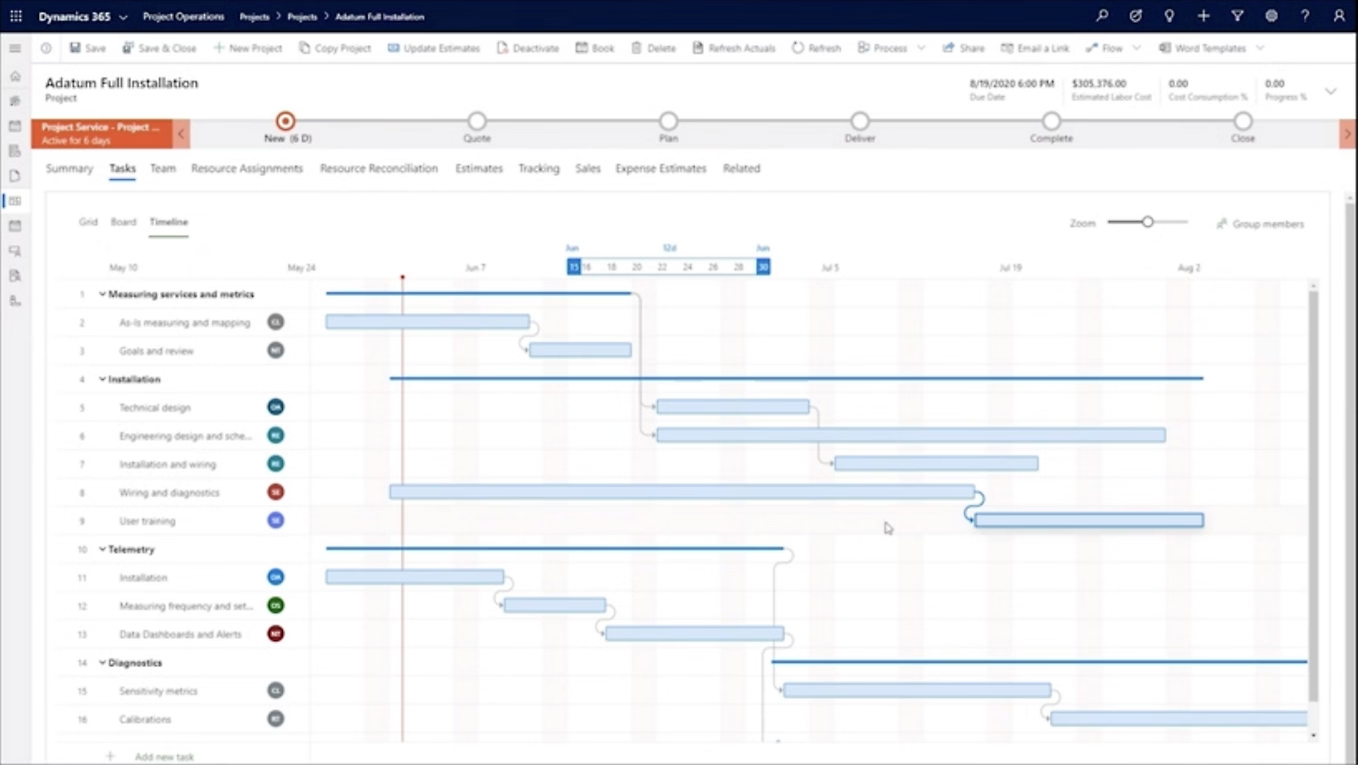
Connect the decisions that shape project performance.
Successful project delivery depends on more than managing tasks. Your teams need to connect commercial commitments, available resources, project activity, and financial information.
Project planning
Build project plans around the work you’ve committed to deliver. Define tasks, timelines, milestones, and dependencies while establishing a clear foundation for project execution.
Resource management
Understand resource availability, skills, and project requirements. Give resource managers the information they need to assign people and manage competing project demands.
Time and expense tracking
Capture project-related time and expenses through defined submission and approval processes. Establish reliable information for monitoring delivery and tracking project costs.
Sales-to-delivery handoffs
Connect project opportunities, estimates, and contract information with project planning. Help delivery teams understand the scope, requirements, and commercial commitments established during the sales process.
Project financial management
Connect project budgets, estimated costs, actual activity, and billing preparation. Align project financial processes with the accounting capabilities and deployment approach your organization requires.
Project reporting and visibility
Bring relevant project, resource, and financial information together. Give project leaders a clearer understanding of progress, utilization, cost variances, and areas that need attention.
FROM ESTIMATE TO DELIVERY
Connect what you sell with what you deliver.
Project performance depends on decisions made before, during, and after delivery. Connect your project estimates, resources, actual work, and financial information to understand how your projects are progressing.
Turn estimates into actionable project plans
Connect project opportunities and commercial commitments with the work your team needs to deliver. Establish clear requirements, project milestones, estimated effort, and delivery responsibilities.
Plan around available resources
Understand resource capacity, skills, and project demand before making assignments. Give resource managers the information they need to balance commitments across projects.
Connect actual work to project progress
Capture project-related time and expenses through consistent submission and approval processes. Compare actual activity with project plans and identify where delivery requirements are changing.
Understand costs, variances, and billing readiness
Connect approved project activity with budgets, estimated costs, and billing preparation. Establish a reliable process for reviewing financial performance and transferring the necessary information to your accounting environment.
IMPORTANT IMPLEMENTATION CONSIDERATION
How will Project Operations connect with your financial systems?
Project Operations supports different deployment approaches depending on the level of project accounting and financial integration your organization requires.
Project Operations Core supports project delivery and financial tracking through pro forma invoicing, while Project Operations Integrated with ERP extends the solution with Dynamics 365 Finance capabilities, including additional accounting and revenue-recognition functionality.
Your existing ERP and financial requirements should influence the deployment decision.
A PARTNER WHO BUILDS AROUND YOU
Project Operations should fit the way you deliver work.
Before configuring your environment, we work to understand how your organization manages projects.
How are projects estimated? Where do sales commitments become delivery requirements? How are resources allocated? What happens when scope changes? How do project managers and finance teams reconcile project costs and billing?
These answers help us evaluate your processes, determine the appropriate deployment approach, and identify which existing systems need to connect.
The objective is to build around your operational requirements rather than forcing your team into processes that don’t fit.
Understand the commitments. Connect the delivery.
AI + COPILOT IN DYNAMICS 365 PROJECT OPERATIONS
Put AI to work across your projects.
Copilot capabilities in Dynamics 365 Project Operations can assist project managers with planning, risk assessment, and reporting.
The available capabilities depend on your environment, configuration, licensing, and applicable product requirements.

Develop project plans faster
Use supported Copilot functionality to generate draft project task plans based on your requirements. Review the suggested tasks and complete the necessary assignments, dependencies, and scheduling details.
Identify potential project risks
Use supported AI assistance to evaluate available project information, suggest potential risks, and develop draft mitigation recommendations. Project managers remain responsible for evaluating the findings and determining appropriate action.
Prepare project status reports
Generate draft status reports using available project information, including relevant schedule and financial data. Review and refine the results before sharing them with stakeholders.
AI depends on reliable project information.
Useful AI assistance starts with accurate project plans, consistent data, and clearly defined responsibilities.
Evaluate the capabilities available in your environment and focus on use cases that support how your team manages projects.
FROM AI ASSISTANCE TO AI-POWERED PROJECT DELIVERY
AI that helps keep projects moving.
Copilot
Helps your teams work
Plan projects, find information, summarize activity, and reduce everyday administrative work.
Agents
Help move work forward
Use AI-driven capabilities to support project workflows, repetitive processes, and coordination across teams.
Custom AI
Built around your project operation
Extend Dynamics 365 with Microsoft’s AI ecosystem to create workflows around your projects, people, data, and business processes.
HOW PRENTICEWORX HELPS
Experienced people. Project solutions built around your business.
Managing projects requires coordination between sales, delivery, resource management, and finance.
PrenticeWorx combines hands-on business experience with Microsoft expertise to help you implement and improve Dynamics 365 Project Operations around your organization’s requirements.
New implementation
Start with your commercial processes, delivery requirements, resource planning, and financial systems. Define an implementation approach that connects the information and processes your project teams rely on.
Optimize your existing environment
Review your current project workflows, resource management, reporting, integrations, and user adoption. Identify opportunities to improve how your team plans, manages, and evaluates project delivery.
Integrations & data connections
Evaluate how Project Operations should connect with your existing CRM, financial systems, and supporting applications. Determine which standard capabilities and integration approaches meet your requirements.
Project recovery
When an existing implementation isn’t delivering what your organization needs, start by understanding the underlying problems. Evaluate the current environment, establish priorities, and develop a practical path forward.
THE BUSINESS CASE
Connect project delivery to business performance.
Dynamics 365 Project Operations connects sales, resourcing, project management, and finance so project-based organizations can manage work with greater visibility from opportunity through delivery and financial performance.
Make better resourcing decisions
Understand resource availability, skills, assignments, and demand. Use consistent information to identify potential capacity problems and evaluate utilization.
Identify margin risks earlier
Compare project estimates, budgets, and recorded activity. Give project leaders the information they need to investigate variances and respond to changing requirements.
Improve financial visibility
Connect project delivery information with the financial processes your organization relies on. Establish consistent reporting that supports project reviews and business decisions.
Microsoft Dynamics 365 Project Operations pricing & licensing
Your Project Operations licensing and implementation requirements depend on your project processes, deployment architecture, existing Microsoft environment, and integration needs.
Explore Microsoft’s published pricing below. PrenticeWorx can help you evaluate the requirements for your environment.
Project Operations
w/Annual Commitment & Upfront Payment
Frequently asked questions
Dynamics 365 Project Operations is a Microsoft application designed for project-based organizations. It connects project sales, planning, resource management, delivery, time tracking, and project financial information.
Project Operations is designed for organizations that manage project-based work and need to coordinate commercial commitments, people, delivery, and financial information.
It can support different project-driven business models. The appropriate deployment and configuration depend on the organization’s specific requirements.
Project Operations supports project estimates, budgets, resource costing, time and expense tracking, and financial visibility.
The available accounting, invoicing, and revenue-recognition capabilities depend on the deployment model and connected financial systems.
Project Operations Core provides project sales, planning, resource management, time and expense tracking, and pro forma invoicing that can be sent to a financial system for processing.
Project Operations Integrated with ERP extends these capabilities through Dynamics 365 Finance, supporting additional financial processes such as project accounting, customer-facing invoicing, and revenue recognition.
Business Central is a broader ERP application supporting financial management, purchasing, inventory, and additional operational processes. It also includes project-management capabilities.
Project Operations focuses more extensively on project-based sales, resource planning, delivery, and associated project financial information.
The appropriate application depends on your operational requirements and existing systems. An organization shouldn’t automatically assume it needs both products.
Project Operations offers different deployment and integration options, including integration with Dynamics 365 Finance and extensibility through Power Platform.
Other integrations depend on your existing applications, data requirements, available connectors, and any custom development needed.
Project Operations offers supported Copilot capabilities for project planning, risk assessment, and project status reporting.
Feature availability depends on your environment, configuration, and applicable requirements. Separately configured agents may require additional licensing or consumption credits.
PrenticeWorx offers Project Operations implementation and optimization services. Reviewing existing workflows, resource management, reporting, configuration, and integrations can help identify problems and prioritize improvements.
Implementation timelines depend on your project processes, financial requirements, resource-management needs, existing systems, data migration, and customization.
An initial assessment helps establish the implementation scope, required integrations, appropriate deployment architecture, and a realistic project timeline.
Following implementation, organizations should monitor adoption, review project reporting, evaluate resource-management processes, and refine workflows as operational requirements change.
Additional optimization, training, and support requirements should be considered during implementation planning.
LET’S TALK ABOUT YOUR PROJECTS
Connect your projects, people, and financial processes.
Whether you’re implementing Dynamics 365 Project Operations or improving an existing environment, start with a conversation about how your organization manages project delivery.
Talk with PrenticeWorx about your operational requirements and what needs to happen next.